Case 14: Graduation Project – My Intelligent Robot
Case Introduction
This lesson is the ultimate capstone project of the PU Robot STEAM curriculum. Working in groups, students will independently design and complete an "intelligent robot" project — they decide what to create and how to build it. Students will go through the full lifecycle of an engineering project, including requirement analysis, scheme design, programming development, testing optimization, and result demonstration. Teachers shift from knowledge instructors to project mentors, providing frameworks and tools while letting students lead creativity and implementation. This final project comprehensively assesses all knowledge and skills from Lessons 1 to 13, and fully trains students’ system thinking, teamwork, problem-solving abilities, and innovative thinking.
Teaching Preparation
| Name | Description |
|---|---|
| PU Robot Kit | 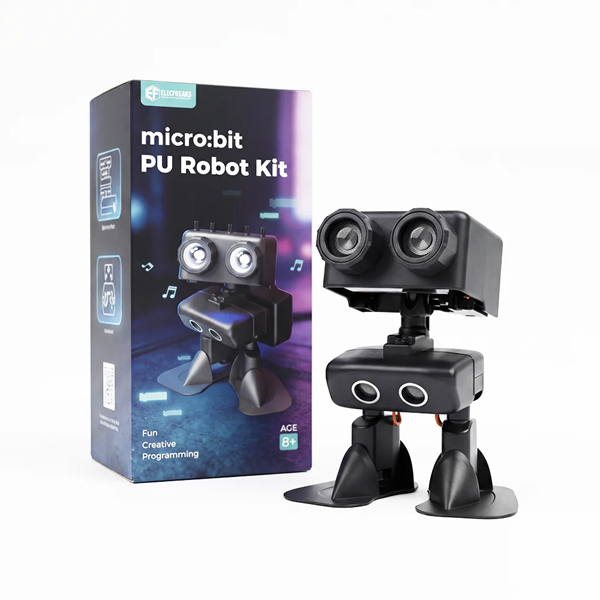 |
| Programming Device (Computer) | One set per group |
| Flat Ground + Scene Materials | Building blocks, cartons, tape, colored paper, scissors for scene decoration |
| Printed Project Planning Form | One copy per group |
| Printed Skills Checklist | Summary of all modules from Lesson 1–13 |
| Timer | For project defense timing |
| Scoring Sheet | Teacher scoring + peer evaluation |
What You Have Learned — Knowledge & Skill Checklist
Before designing your project, review all skills you have mastered in the past 13 lessons:
| Module | Related Cases | What You Can Do |
|---|---|---|
| Remote Control | Case 1 / 2 | Control robot movement, turning, and kicking actions via controller |
| Basic Programming | Case 3 | Add software libraries, write button-triggered programs, download code |
| Sequence & Delay | Case 3 / 4 | Control action sequence and duration |
| Loop Module | Case 5 | Repeat movements automatically for designated times |
| Combined Actions | Case 6 | Connect multiple actions and loops to create performances |
| Variables | Case 7 | Store and adjust parameters such as walking time and loop counts |
| Conditional Judgment | Case 8 | Use if…then…else to realize logical branches |
| Music Module | Case 9 | Play melodies and match movements with music beats |
| Lighting Control | Case 10 | Adjust RGB colors, eye light switches, and lighting animation effects |
| Emotional State Machine | Case 11 | Store states with variables, branch via conditions, switch moods by buttons |
| Ultrasonic Sensor | Case 12 | Detect forward distance and realize multi-level behavioral responses |
| Precision Control | Case 13 | Low-frequency stepping, parameter tuning, and real-time sensor detection |
Teacher Tip: Post the skill checklist on each group’s desk for quick reference during design. Encourage students to challenge unfamiliar modules — the graduation project is the best opportunity for review and innovation.
Overall Project Timeline
| Stage | Period | Core Tasks | Deliverables |
|---|---|---|---|
| Stage 1: Project Launch | Period 1 | Confirm theme, form teams, complete project planning form | Project Planning Document |
| Stage 2: Scheme Design | Period 1–2 | Design functions, draw flowcharts, confirm module combination | Design Scheme + Flowchart |
| Stage 3: Programming Development | Period 2–3 | Write code, test modules separately, integrate functions | Runnable Program |
| Stage 4: Testing & Optimization | Period 3–4 | Functional testing, parameter adjustment, bug fixing | Optimized Final Program |
| Stage 5: Achievement Demonstration | Period 4 | Project defense, on-site demonstration, peer evaluation | Project Display & Scores |
Teacher Tip: It is recommended to complete the project in 4 class periods. If time is limited, merge testing and development stages, but retain the final presentation session — it greatly enhances students’ technical expression and confidence.
Course Objectives
Independently design and complete a fully functional robot project by integrating all learned modules (movement, loop, conditional judgment, variables, music, lighting, ultrasonic sensor, button interaction);
Master standard engineering processes: requirement analysis → scheme design → programming → testing & optimization → result sharing, and build core engineering thinking;
Complete project forms and flowcharts, and express design ideas through documents and diagrams;
Clearly introduce design concepts, technical implementation, and optimization processes in project defense, improving technical presentation skills and teamwork.
Course Introduction
Congratulations on reaching the final lesson!
Over 13 lessons, you have grown from a beginner with a remote controller to a young programmer who can make robots walk, dance, sing, change lights, sense distance, express emotions, and park precisely.
Today is your graduation project. This time, there are no fixed tasks. You decide everything. What kind of robot will you create? A cute pet robot, a smart butler, a dancing performer, an explorer, or a unique creative machine? What special skills does it have? What problems can it solve? What makes it different?
There is only one rule: integrate at least 4 different modules to create a creative, story-driven, and stable project.
Just like real engineers, you will turn your ideas into real works step by step. Your graduation project starts now!
Learning Exploration
Project Launch
Brainstorm Project Themes
Guide groups to discuss freely with 4 core guiding questions:
① What is your robot’s identity? (Name your robot and set its personality)
② What core functions will it have? (List at least 3 key features)
③ Which technical modules will you use? (Check from the skill list)
④ What is your most innovative highlight? (Unique design to impress judges)
Teacher Guidance Principles:
- No theme restrictions, support creative ideas
- Provide inspiration for teams with unclear ideas:
- Which lesson was your favorite? Can you upgrade its functions?
- Is there a small problem in daily life that a robot can solve?
- What kind of robot would you like to create?
- Verify feasibility to ensure the project matches hardware performance and class time limits
Team Formation & Role Division
3–4 students per group with clear job roles:
| Role | Responsibilities | Required Abilities |
|---|---|---|
| Project Manager | Schedule arrangement, coordination, final defense | Communication & time management |
| Programmer | Code writing, program debugging | Logical thinking & coding skills |
| Creative Designer | Function planning, lighting/movement/music arrangement | Creativity & aesthetic awareness |
| Test Engineer | Function testing, parameter tuning, bug recording | Carefulness & data analysis |
Teacher Tip: Roles can be combined, but each task needs a person in charge. Encourage students to try new roles for comprehensive improvement.
Scheme Design
Draw Program Flowcharts
Guide students to draw intuitive block diagrams for their program logic:
- Mark corresponding technical modules for each logical branch
- Teachers provide on-site guidance to optimize logical structure
Modular Task Splitting
Divide the whole project into independent units for separate development and testing:
| Module | Content | Testing Standard |
|---|---|---|
| Interaction Module | Button / sensor trigger & state switching | Stable and accurate response |
| Behavior Module | Movements, lighting, music performance | Consistent with design effects |
| Logic Module | Loops, conditions, variable control | Correct judgment and stable operation |
Teacher Tip: Test each module individually before overall integration, which is the core idea of unit testing in software engineering.
Programming Development
Modular Programming Suggestions
Recommended development order:
- Define variables, set up button/sensor triggering and LED status display
- Write independent programs for movements, lights, and music in different modes
- Integrate all modules and optimize switching fluency
Problem Log Recording
Each group records bugs, problems, and solutions during development:
| No. | Problem Description | Tried Solutions | Solved | Final Method |
|---|---|---|---|---|
| 1 | ||||
| 2 | ||||
| 3 |
Teacher Tip: A complete problem log helps students accumulate engineering experience and can be referenced in future maker projects.
Testing & Optimization
Functional Testing Checklist
Check all items one by one before finalization:
| Test Item | Method | Expected Result | Pass |
|---|---|---|---|
| Trigger Response | Press buttons / trigger sensors | Functions respond correctly | ✅/❌ |
| Movement Performance | Observe robot actions | Smooth and coherent movements | ✅/❌ |
| Lighting Effect | Check light changes | Colors and flashes match design | ✅/❌ |
| Music Playback | Listen to sound feedback | Melody and rhythm are normal | ✅/❌ |
| Sensor Detection | Place obstacles for testing | Accurate distance judgment | ✅/❌ |
| Long-Term Operation | Run continuously for 3 minutes | No crash or freeze | ✅/❌ |
| Exception Adaptation | Quick operations and extreme tests | Program runs stably and recovers normally | ✅/❌ |
Parameter Tuning
Follow the optimization experience from the precision parking challenge:
- Adjust only one parameter at a time
- Repeat each test 3 times to confirm stability
- Record data changes before and after optimization
Scene Decoration & Appearance Design
Use handmade materials to enrich the presentation effect:
- Make costumes or decorations for the robot
- Build mini scenes such as stages, mazes, and houses
- Design project name cards and introduction posters
Achievement Demonstration
Project Defense Process
3–5 minutes per group with fixed presentation steps:
| Session | Duration | Content |
|---|---|---|
| Project Introduction | 1 min | Project name, robot setting, creative inspiration |
| On-Site Demonstration | 2 mins | Show all core functions in action |
| Technical Explanation | 1 min | Introduce program structure and applied modules with flowcharts |
| Difficulty Sharing | 0.5 min | Key difficulties in development and solutions |
| Q&A Session | 1 min | Answer questions from teachers and classmates |
Scoring Criteria
| Dimension | Score | Evaluation Key Points |
|---|---|---|
| Function Completeness | 25 | All core functions realized; stable operation |
| Technical Depth | 20 | At least 4 modules applied; reasonable and rigorous logic |
| Creative Design | 20 | Unique ideas; delicate lighting/movement/music design |
| Presentation Performance | 15 | Clear speech; standardized flowchart and documents |
| Teamwork | 10 | Reasonable division of labor; complete problem records |
| Bonus Points | 10 | Extra highlights such as scene decoration, complex logic, high stability |
Peer Evaluation
Each group scores other teams and fills in the mutual evaluation form to complete interactive evaluation and learning.