Case 4: Action Sequence and Delay Optimization
Case Introduction
On the basis of proficiently using the blocks "when button A is pressed", "walk straight", "kick" and "pause", guide students to explore the influence of action sequences on the robot's execution effect, learn to optimize delay parameters, deepen programming logic, improve program debugging ability, and lay a foundation for subsequent combined action programming.
Teaching Preparation
| Name | Diagram |
|---|---|
| PU Robot Kit | 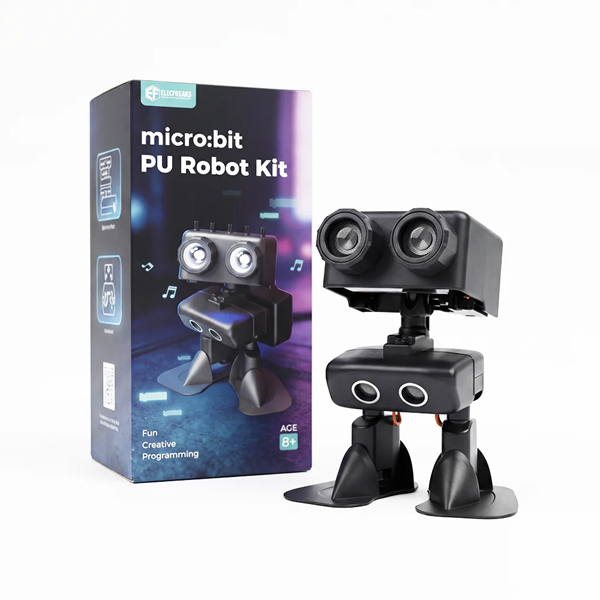 |
| Programming Device (Computer) | |
| Flat Ground |
Course Objectives
- Proficiently use the blocks "when button A is pressed", "walk straight", "kick" and "pause", and master the core usage of each block;
- Learn to adjust the robot's action sequence, observe the execution effects of different sequences, and understand the programming logic that "command sequence determines action sequence";
- Master the optimization method of delay parameters, set delays reasonably according to the duration of action completion, and improve the fluency of the program;
- Cultivate basic programming debugging ability and logical thinking, and pave the way for subsequent combined action programming.
Course Introduction
In the last class, we learned to write simple programs with the blocks "when button A is pressed", "walk straight", "kick" and "pause". Some students found that sometimes the connection between the robot's actions is not smooth, or the action sequence is not as expected. Why is that? Today we will explore the secrets, learn to adjust the action sequence and optimize the delay parameters, so that the robot's actions are smoother and more in line with our requirements.
Learning Exploration
Review of Previous Knowledge: Guide students to review the blocks "when button A is pressed", "walk straight", "kick" and "pause" learned in the last class. Ask: "What is the function of each block? What was the sequence of the programs we wrote before?" Invite students to demonstrate dragging and combining blocks on stage to consolidate previous knowledge and pave the way for new lessons.
Exploration of Action Sequence: Put forward an exploratory question: "Will the robot's execution effect be different if we change the action sequence?" Guide students to discuss in groups and guess the execution effects of different action sequences. Then assign a task: write two sets of programs. One is "when button A is pressed → walk straight → pause for 3 seconds → kick once → stop", and the other is "when button A is pressed → kick once → pause for 1 second → walk straight → pause for 3 seconds → stop". Download them to the robot for testing, record the execution differences of the two sets of programs, and summarize the conclusion that "different action sequences lead to different robot execution effects".
Optimization of Delay Parameters: In view of the unsmooth connection of actions in the program, guide students to think: "What is the function of the pause block? What impact will it have if the delay parameter is set too long or too short?" Guide students to try adjusting the delay parameters, such as changing the delay after "walk straight" from 3 seconds to 2 seconds or 4 seconds, observe the fluency of the robot's action connection, and summarize the rule: the delay parameter should match the duration of action completion. Too long a delay will lead to long action intervals, while too short a delay will cause stuttering in action connection.
Classroom Activity: Organize a programming-controlled robot walking challenge. The map can be designed independently according to the classroom venue.
Makecode Programming
Program 1:
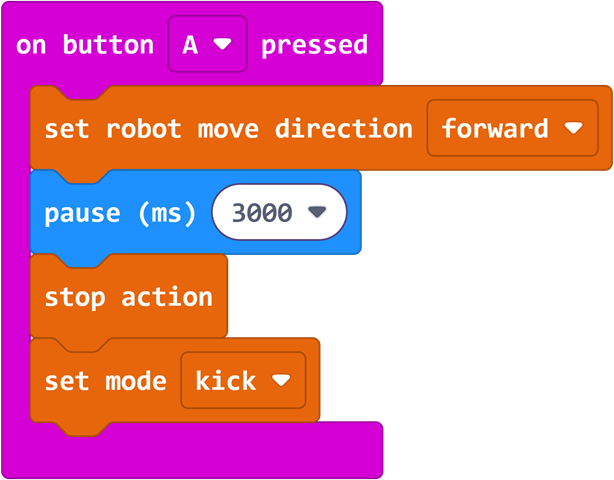
Program Link: https://makecode.microbit.org/_DwbHT85Ve5a1
Program 2:
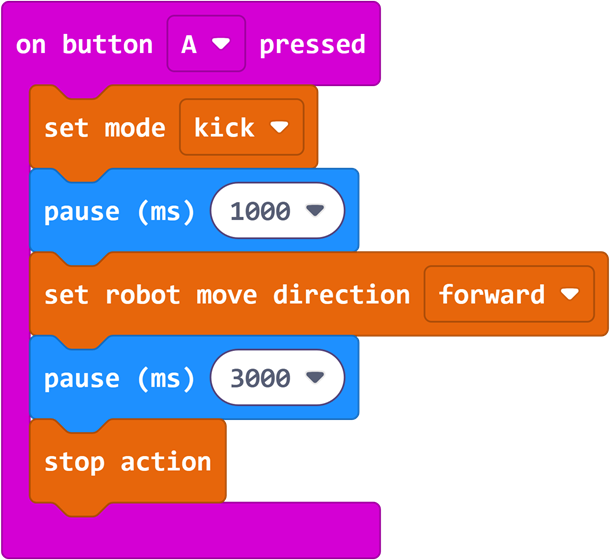
Program Link: https://makecode.microbit.org/_X7JH8pYaKXV0
Summary & Sharing
Invite each group to share their programming experience and observation results of classroom activities. Combined with students' sharing, the teacher briefly explains the sequential execution of programs and the function of the pause block.