Case 9: Beat Following Programming – Robot Dancing with Music
Case Introduction
Based on mastering sequential execution, loops, conditional judgment, and variables, this case guides students to learn the music module in MakeCode. By combining musical beats with robot movements, students will write programs to "perform actions following the music beats". Through counting beats and designing movement rhythms, students will experience the integration of programming and musical art, cultivate creative programming skills and a sense of rhythm, and turn the robot into a "little dancer" for a wonderful human-robot dance performance.
Teaching Preparation
| Name | Image |
|---|---|
| PU Robot Kit | 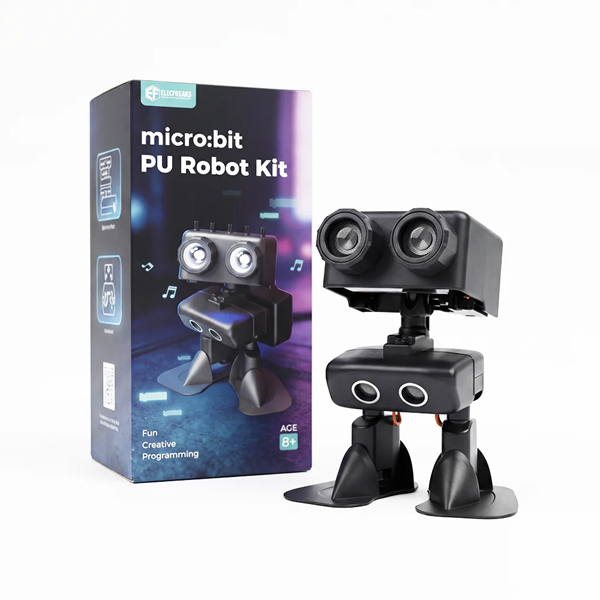 |
| Programming Device (Computer) | |
| Flat Ground |
Course Objectives
Learn the basic use of the MakeCode music module and be able to add music playback functions to programs;
Understand the concept of "music beats" and set appropriate delay parameters to match robot movements with music rhythm;
Comprehensively use action modules, loop modules, and music modules to write programs for "performing actions following beats";
Experience the integration of programming and musical art, and cultivate a sense of rhythm and creative design ability.
Course Introduction
Class, have you ever clapped along to music? Music can be fast or slow, and our movements change with the rhythm. Today we are going to do something amazing – program the robot to "dance to the music"! Let the robot hear the music, move to the beat, and become a real "music dancer". We will use a new tool – the music module. Let’s explore the wonderful sparks created by programming and music!
Learning Exploration
Beat Warm-up: The teacher plays a clear rhythm melody and guides students to clap along to feel "the time interval between each beat". Ask: "About how long is the interval between each beat? If the robot performs one action per beat, how long should the delay be between actions?" Guide students to perceive beats with their ears and connect life experience with the "delay" parameter in programming.
New Module Learning – Music Module: Introduce the basic use of the MakeCode music module:
- Find the "Music" category in MakeCode and learn common blocks:
- "Play tone": Makes the micro:bit produce a sound of a specified pitch;
- "Play melody": Built-in multiple simple melodies available for direct playback;
- Beat unit: MakeCode uses "beat" as the music time unit, 1 beat = set milliseconds;
- Demonstrate adding the "play melody" block to the program and hear the music effect after downloading to the robot;
- Key note: Music playback and robot movements can run simultaneously or alternately. In this lesson, we will make the robot "perform one action and play one tone at a time" to experience the coordination of movements and music.
- Find the "Music" category in MakeCode and learn common blocks:
Correspondence Between Beats and Delays: Guide students to understand the relationship between beats and delays:
- Simple explanation: Fast beats → short delays → fast movements; Slow beats → long delays → slow movements;
- Guide students to clap beats, estimate "how long 1 beat lasts", then input this time into the delay block. Precise calculation is not required – just feel the corresponding relationship;
- Emphasize: Delay parameters do not need to be completely precise. Success is achieved when the movements "look matched with the music"!
Design Action Beat Chart: Guide students to discuss in groups and design a simple "action beat chart" before programming:
Beat Number Action Delay (ms) Beat 1 Nod once 500 Beat 2 Kick once 500 Beat 3 Nod once 500 Beat 4 Kick once 500 Let students plan on paper first before programming, cultivating the good habit of "design first, code later".
Group Programming & Debugging: Each group converts the action beat chart into a MakeCode program and completes step by step:
Basic Task: Write a program "when button A is pressed → play a melody → repeat 4 times (nod once → delay → kick once → delay) → stop". Test the coordination of movements and music, adjust delays for more natural movement rhythm;
Advanced Task: Design a performance program including at least 3 different movements (nod, kick, turn) with music, letting the robot complete a rhythmic performance. Groups appreciate and evaluate each other’s work.
MakeCode Programming
Program 1: Basic Beat-Following Dance Program (Basic Task)
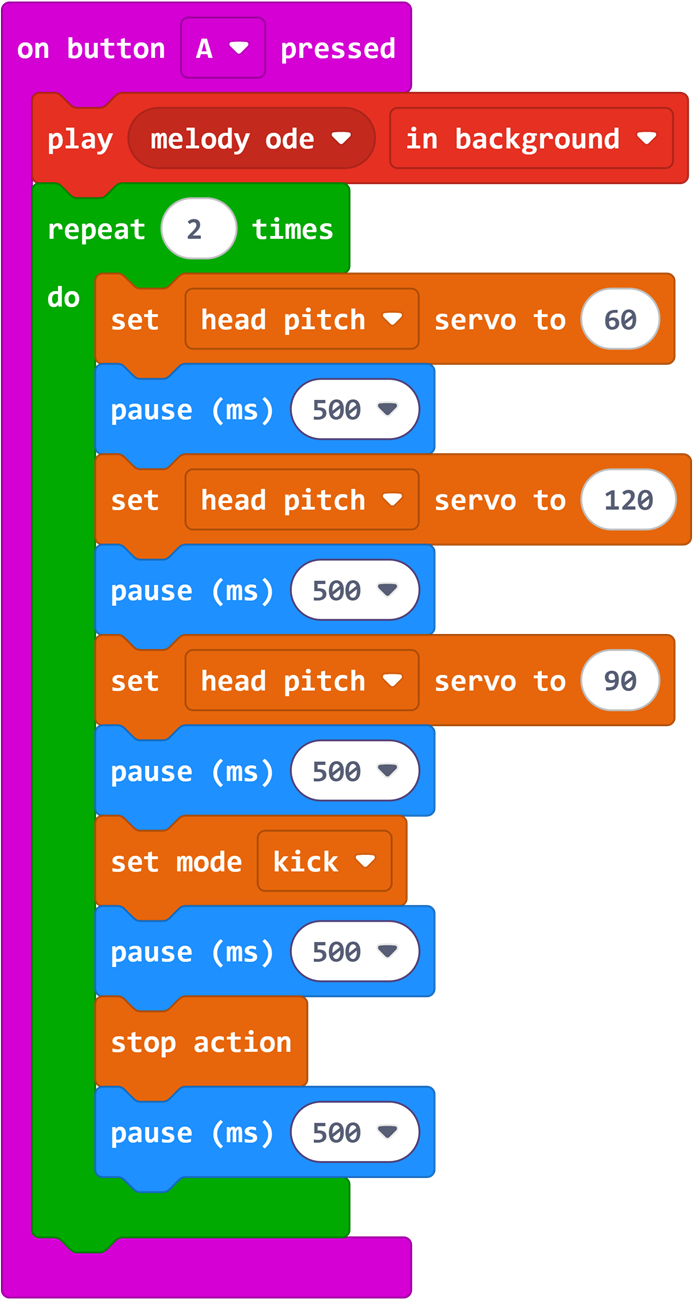
Program Link: https://makecode.microbit.org/_UAbCaC2YxWtA
Summary & Sharing
Invite each group to present the robot’s music dance performance. Other groups appreciate and evaluate: How well do the movements coordinate with the music rhythm? Which group has the most interesting creativity? Combining the presentations, the teacher summarizes: Music has beats, programs have delays. When the two correspond, robots can "dance to music". Programming is not just cold code – it can combine with music and art to create fun works! Preview that the next lesson will comprehensively use all learned modules to challenge a more complex comprehensive theme performance project.