Case 11: Emotional Robot – Expressing "Moods" with Lights
Case Introduction
In Case 10, we learned to control the PU Robot’s 4 RGB LEDs and 2 white spotlights, and created a "three-in-one" performance combining lights, movements, and music. However, those lights were just "special effects" to add visual appeal to the show.
Today, we will give lights a brand-new meaning: emotions. Green means "happy" – the robot jumps around and plays cheerful melodies; blue means "calm" – the robot nods slowly and plays soft tones; red means "angry" – the robot stamps and kicks and plays rapid drum beats... Students will use variables to store the "current mood", use conditional judgments to switch the robot’s movements, lights, and music according to moods, design a complete emotional state machine system, and let users switch the robot’s moods in real time via buttons. This case moves from "programming skills" to "system design", letting students experience the core engineering idea of "state-driven behavior".
Teaching Preparation
| Name | Image |
|---|---|
| PU Robot Kit | 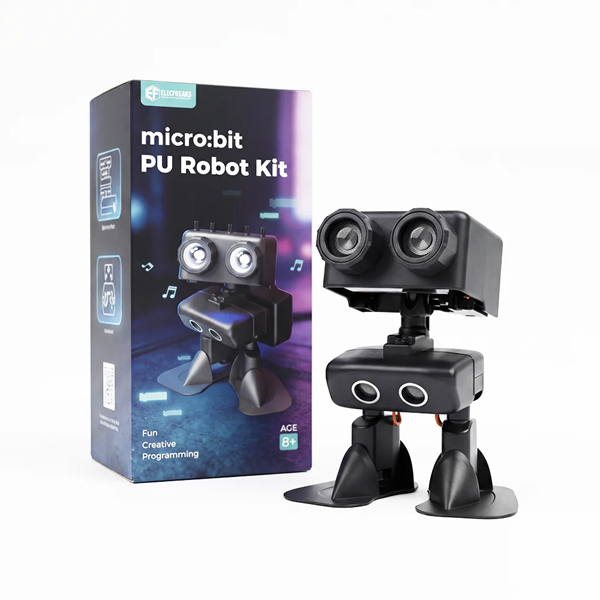 |
| Programming Device (Computer) | |
| Flat Ground | |
| Printed "Mood Design Cards" (one per group) |
Hardware Review – Lighting System and Emotional Expression
| Lighting Type | Quantity | Emotional Expression Potential |
|---|---|---|
| RGB Full-Color LED | 4 | Different colors = different emotional tones; fade / flash = emotional intensity |
| White Spotlight (Eye Light) | 2 | Steady on = eyes open; off = eyes closed; flash = blink / nervous |
Teacher Tip: Humans express emotions through facial expressions – eyes, eyebrows, and mouth each play a role. The PU Robot’s "eyes" are the 2 white spotlights, and its "complexion" is the 4 RGB LEDs. Guide students to think: How do movie and animation characters convey emotions through colors? (Green = peaceful / growing, Blue = sad / calm, Red = angry / dangerous, Yellow = energetic / alert, Purple = mysterious / magical)
Course Objectives
Understand the programming idea of "state-driven behavior" and learn to use variables to store the robot’s current emotional state;
Design a complete mapping relationship of "mood → lighting → movement → music" and use conditional judgments to achieve differentiated behaviors under different moods;
Master the interactive method of "mood switching" via button input, allowing users to change the robot’s mood in real time;
Comprehensively use all learned modules (movement, loop, conditional judgment, variable, music, lighting, button) to complete the "Emotional Robot" system project, cultivating system design and creative expression abilities.
Course Introduction
Class, have you ever noticed – how are characters’ "moods" shown in movies? For example: happiness is yellow, sadness is blue, anger is red, fear is purple, and disgust is green. Colors themselves can convey emotions!
What about our PU Robot? It has 4 color-changing RGB lights, 2 switchable eye lights, and can walk and sing – this is a ready-made "expression system"!
Today, we will give the robot "emotions". When it’s happy, it jumps and glows green all over; when it’s angry, it stamps and kicks with flashing red eyes; when it’s tired, it nods slowly with soft blue breathing lights... Press a button, and it "changes mood" – the robot’s movements, lights, and music all change accordingly, just like installing an "emotional brain" for it!
Learning Exploration
Step 1: Design the Emotional System – From "Color" to "Complete Personality"
Correspondence Between Moods and Colors: Guide students to discuss what emotions different colors represent and reach a consensus:
Mood Main Color Eye Light Effect Meaning 😊 Happy Green Steady on (wide eyes) Joyful, positive, energetic 😢 Sad Blue Slow flash (teary blink) Sorrowful, low, needing comfort 😠 Angry Red Fast flash (fierce stare) Furious, impatient, powerful 😴 Sleepy Yellow Occasional flash (drowsy) Tired, lazy, relaxed 😲 Surprised Purple Flash 3 times (wide eyes) Shocked, curious, excited Distribute "Mood Design Cards": Each group receives a design card, selects 3~5 moods, and fills in the corresponding lights, movements, and music for each mood:
Mood RGB Color Eye Light Robot Movement Happy Green Steady on Jumping (alternating kicks and jumps) Sad Blue Slow flash Slow nodding 3 times Angry Red Fast flash Stamping and kicking 3 times Sleepy Yellow Occasional flash Standing still / slight swaying Surprised Purple Flash 3 times Looking up - Teacher Tip: Movement design should match emotional characteristics – happy should be bouncy and light; angry should be forceful and rapid; sleepy should be slow and lazy. Encourage students to imitate with their bodies first, then convert to robot movements.
Step 2: Emotional Variables and State Management
Create Mood Variables:
- Create a variable
CurrentMoodand use numbers to code different moods:1= Happy,2= Sad,3= Angry,4= Sleepy,5= Surprised
- Set the initial value to
1(default "Happy" state on startup)
- Create a variable
Button Mood Switching: Write "on button pressed" events to switch moods:
Button Function Press A Switch to next mood (cycle 1→2→3→4→5→1) Press B Switch to previous mood (cycle 5→4→3→2→1→5) - Programming Logic: When button A is pressed { CurrentMood += 1; if CurrentMood > 5 { CurrentMood = 1 }; play switch sound; show mood number on LED }
Switch Feedback: Provide clear visual + auditory feedback to the user each time moods are switched:
- Show mood number (1~5) on LED
- Lights flash the new mood color twice ("preheating" effect)
- Play a short sound prompt to confirm successful switch
Step 3: Mood-Driven Behavior System
- Core Logic – Emotional State Machine: In the "forever" loop, execute different behaviors based on the
CurrentMoodvariable:
- Teacher Tip: This is the "State Machine" concept in computer science – the system is in one "state" (mood) at any time, states determine behaviors, and external events (buttons) can switch states. Vending machines, traffic lights, and game character AI are all state machines.
- Behavior Differentiation Key Points: Guide students to note obvious differences in the same parameters under different moods:
| Parameter | Happy | Sad | Angry | Sleepy | Surprised |
|---|---|---|---|---|---|
| Movement Speed | Fast | Very slow | Very fast | Extremely slow | Sudden burst |
| Movement Range | Large | Small | Very large | Tiny | Medium |
| Delay | Short (0.3s) | Long (1.5s) | Extremely short (0.2s) | Very long (2s) | Medium (0.5s) |
- Discussion: Why is the delay shortest for "Angry" and longest for "Sleepy"? (More intense emotions → faster movements → shorter delays; calmer emotions → slower movements → longer delays)
Step 4: Complete the Comprehensive Project
- Phased Development:
- Phase 1: Build the basic "variable + button switch" framework. Press A/B keys to switch mood numbers displayed on LED, confirm normal state switching;
- Phase 2: Implement complete behaviors for 2 moods (e.g., "Happy" and "Angry") – lighting + movement + music, check obvious effect differences;
- Phase 3: Gradually add behaviors for remaining moods, ensure unified style of lighting, movement, and music for each mood;
- Phase 4: Tune parameters – movement range, delay rhythm, light flash frequency, making each mood’s "personality" distinct.
- Creative Bonus Items (for advanced groups):
- Emotional Gradient Transition: Lights fade from old color to new color when switching moods (gradually change RGB values with loops)
- Random Trigger: Robot switches moods "autonomously" at random intervals (use "random number" block) to simulate "mood changes"
- Emotional Interaction: Use ultrasonic sensor – turn "Happy" when someone approaches (welcome), "Surprised" if too close, "Sad" if ignored
- Emotional Diary: Use variables to record duration of each mood, show "Last mood lasted X seconds" on LED when switching
- Project Presentation Preparation:
- Prepare a 2-minute demo: show all mood switching effects
- Explain design ideas: Why use this color / movement / music for the mood?
- Share the hardest debugging part and solutions
MakeCode Programming
Basic Mood Switching
Program 1: Button Mood Switch + LED Mood Number Display
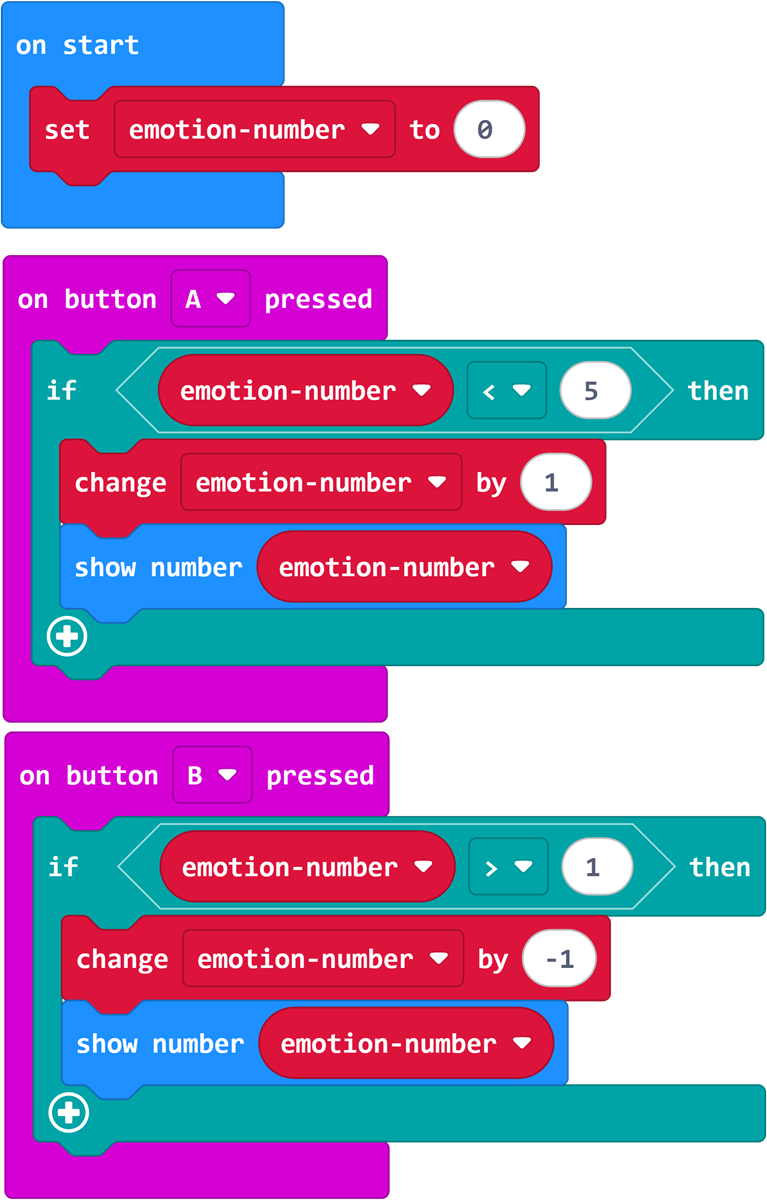
Program Link: https://makecode.microbit.org/_TeTaL7J6tFMU
Emotional Behavior System
Program 2: Complete Emotional Robot Program – Mood-Driven Lighting + Movement + Music State Machine
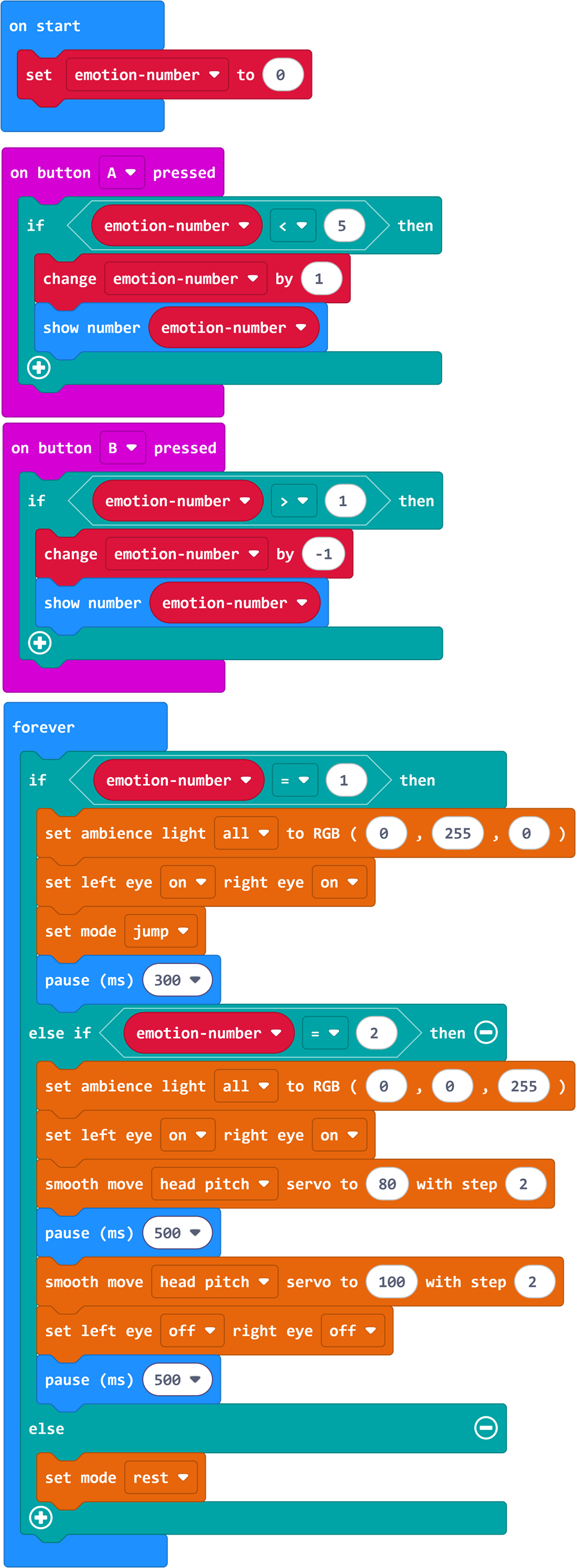
Program Link: https://makecode.microbit.org/_Mj13bxe6yHJe
Summary & Sharing
Each group presents all mood switching effects of the "Emotional Robot". Other groups evaluate: Which mood design is most vivid? Why? Combining presentations, the teacher summarizes:
Color is the language of emotion: Painters use colors to express feelings, designers use colors to guide user behavior, and we use colors to give robots "soul". From today on, lights are not just "special effects" but "expression";
State Machine – From "Process" to "System": Previous programs were "run from start to finish" processes (sequential structure), while today’s program is a "do different things based on state" system (state machine). Traffic lights, game AI, and vending machines are all state machines;
Parameters hold "personality": The same kick with 0.2s delay is "irritable", with 2s delay is "lazy". The same flash: fast = nervous, slow = calm. Programming is not just making robots move, but making them "move with personality";
Design thinking core is "empathy": When designing an emotional robot, you must put yourself in the robot’s role – what would I do if happy? If angry? Good design is not just technology stacking, but truly understanding "user (or character) feelings".
After-Class Extension
Challenge 1: "Mixed Emotions" – Real human emotions are rarely pure, often "happy and nervous" or "sad and touched". Design a "mixed emotion" system: e.g., 2 RGB LEDs show one color, the other 2 show another color, movements blend two styles;
Challenge 2: "Emotional Story" – Design an "emotional change script": robot goes through automatic mood changes over time: happy going out → sad facing difficulty → happy solving problem → sleepy at night. Use "delay" to control each mood’s duration and tell a complete emotional story;
Further Exploration: Research "Affective Computing" – how do computer scientists make AI recognize and express human emotions? What "emotional" designs do smart speakers and virtual assistants have? Think: Can robots really have "emotions"? What’s the difference between program-simulated "emotions" and real human emotions?