Case 7: Basic Variable Application – Flexible Control of Action Count and Rhythm
Case Introduction
Based on mastering sequential execution structures, loop modules, and various action blocks, this case guides students to learn the basic use of the "variable" module in MakeCode. Students will understand that variables act as "replaceable values" for program parameters, and can flexibly control the robot’s action count and action rhythm (delay duration) by modifying variable values. Combining mathematical quantitative relationships, students will experience the advantage of variables – "modify one place, change the whole program", cultivate advanced programming thinking and mathematical application ability, and lay a foundation for subsequent conditional judgment programming.
Teaching Preparation
| Name | Image |
|---|---|
| PU Robot Kit | 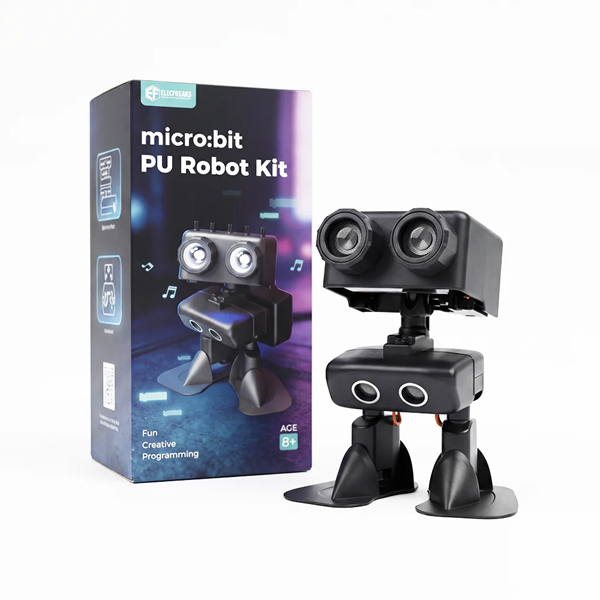 |
| Programming Device (Computer) | |
| Flat Ground |
Course Objectives
Understand the concept of "variables", and master the methods of creating, assigning, and modifying variables in MakeCode;
Associate variables with the "repeat count" parameter of the loop module, and flexibly control the robot’s repeated action count by modifying variable values;
Associate variables with delay blocks, control the speed of action rhythm by modifying variable values, and experience the differences in robot action effects under different rhythms;
Understand the core advantage of variables compared with fixed parameters – "modify one place, change the whole program", improve program flexibility, and deepen advanced programming thinking.
Course Introduction
In previous lessons, the numbers in our programs were fixed, such as "repeat kick 3 times" or "delay 2 seconds". If we want to change it to 5 kicks, we have to find and modify each block one by one. Today we will learn a "super tool" in programming – variables! A variable is like a labeled "number box": we put a number in the box, and all parts of the program that need this number take it from the box. Changing the number in the box once updates the entire program! Learning variables will make controlling the robot more flexible and efficient!
Learning Exploration
Review Prior Knowledge: Review the method of using fixed numbers to control loop counts and delays in Case 6. Ask: "If we want to change all kick counts in the performance from 2 to 4, how many places do we need to modify? What if the same count appears 6 times in the program?" Guide students to feel the limitations of fixed parameters and motivate variable learning based on real needs.
New Concept Learning – What Are Variables: Explain variables using real-life analogies:
- A variable is like a labeled box; the label is the variable name (e.g.,
Action Count), and the content inside is the variable value (e.g.,3); - When the program runs, it automatically retrieves the value from the box every time it encounters the variable name;
- Modifying the variable value only once applies to all places using the variable in the program – this is "modify one place, change the whole program";
- Compared with fixed numbers, variables make programs more flexible and easier to modify.
- A variable is like a labeled box; the label is the variable name (e.g.,
MakeCode Variable Operation Demonstration: Demonstrate the complete steps of using variables in MakeCode:
- Create a variable: Click the "Variables" category → Click "Make a variable" → Name it
Action Count; - Set initial value: In the "on start" module, add the block "set
Action Countto3"; - Replace fixed parameters: Replace the fixed number
3in the loop module "repeat n times" with the variableAction Count; - Verify effect: Download the program and observe the robot kicking 3 times;
- Modify variable value: Change
Action Countfrom3to5, re-download, and observe the robot kicking 5 times; - Compare the two program structures and emphasize: "The loop module and delays remain unchanged; only the variable value is modified, but the effect changes completely."
- Create a variable: Click the "Variables" category → Click "Make a variable" → Name it
Math Integration Exploration – Quantitative Relationships: Guide students to combine mathematical knowledge to think about the quantitative relationship between variable values and action results:
- Ask: "If the variable
Action Countis set to 4, how many times does the robot kick? What if set to 6?" – Establish the direct quantitative correspondence: "variable value = action count"; - Advanced question: "If two loops in the program both use the variable
Action Count, and the variable is set to 3, how many total actions does the robot perform?" – Guide students to calculate3×2=6and experience the multiplicative relationship when variables are reused; - Guide students to complete a record sheet, matching different variable values with corresponding actual action counts, and understand the role of variables from a mathematical perspective.
- Ask: "If the variable
MakeCode Programming
Program 1: Use a Single Variable to Control Repetitive Action Count (Basic Task)
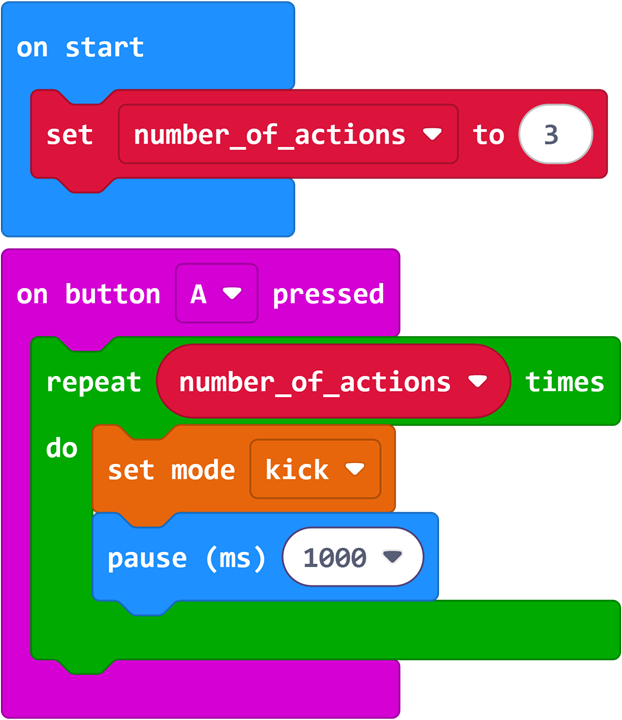
Program Link: https://makecode.microbit.org/_0EH95u4T6iX9
Program 2: Use Dual Variables to Control Both Action Count and Rhythm Duration (Advanced Task)
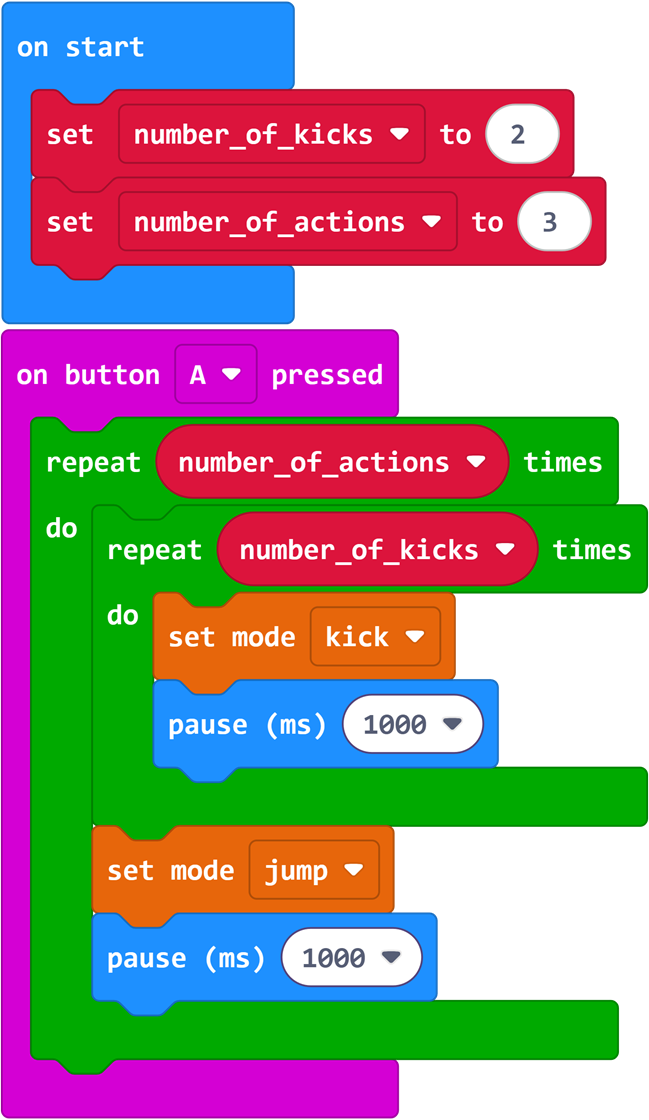
Program Link: https://makecode.microbit.org/_W5mARy8gcY5J
Summary & Sharing
Invite each group to share their exploration results: How did the robot’s action count and rhythm change after modifying variable values? What advantages do variables have compared to directly writing fixed numbers? Combining students’ sharing, the teacher emphasizes the core value of variables – "using a name to represent a number, modify one place, change the whole program", making programs more flexible and maintainable. Preview that the next lesson will learn the "conditional judgment" module, enabling the robot to "make its own decisions" based on sensor detection results – a step toward a truly intelligent robot.