Case 5: Loop Module Programming - Automating Repetitive Actions
Case Introduction
On the basis of mastering the sequential execution structure and basic action blocks, this case guides students to learn loop modules in MakeCode (such as "repeat n times / forever loop"), understand the concept and advantages of loop structures, and learn to use loop modules to automate repetitive robot actions. It helps avoid repeatedly dragging blocks, improves programming efficiency, cultivates logical thinking ability, and lays a foundation for subsequent combined action programming.
Teaching Preparation
| Name | Image |
|---|---|
| PU Robot Kit |  |
| Programming Device (Computer) | |
| Flat Ground |
Course Objectives
Understand the concept of loop structures, and master the functions and usage of the "repeat n times / forever loop" modules in MakeCode;
Learn to nest existing basic action blocks (such as straight movement, leg kicking, delay) into loop modules to automate repetitive actions;
Be able to compare the code structure differences between "non-loop programs" and "loop programs", and understand the simplicity and efficiency of loop modules;
Cultivate efficient programming thinking, improve program writing and debugging skills, and deepen the understanding and application of MakeCode graphical programming.
Course Introduction
In the last class, we learned to adjust action sequences and optimize delay parameters, enabling the robot to complete various actions smoothly in order. But what if we want the robot to perform the same action 10 or 20 times? Do we have to drag the same block 10 or 20 times? That's way too troublesome! Today we will learn a "lazy artifact" - the loop module! Just tell the robot "how many times to repeat", and one block will do the job. Let's see how powerful the loop module is!
Learning Exploration
Review Previous Knowledge: Guide students to review the sequential execution structure and basic blocks learned in Case 4, and ask: "What action blocks have we mastered? If we want the robot to kick its legs 5 times continuously, how to write the program using the sequential execution structure?" Ask students to try dragging 5 "kick leg" blocks in MakeCode, intuitively feel the tediousness of repeated operations, and stimulate their interest in learning loop modules.
Learn New Module - Loop Module: Focus on introducing loop modules in MakeCode, and explain the function of the "repeat n times" block: nest the action blocks to be repeated inside the loop module, set the number of loops n, and the program will automatically repeat the specified actions n times when running, without dragging blocks repeatedly. Demonstrate the operation steps:
- Find the "Loops" category in the MakeCode module area, and drag the "repeat n times" block to the programming area;
- Nest the "kick leg" and "delay" blocks inside the loop module;
- Set the number of loops (e.g., 3 times), run the program, and observe the robot automatically kicking its legs 3 times repeatedly;
- Compare the code structure of the "non-loop version" (dragging 3 kick leg blocks) with the "loop version", and clarify the simplicity of the loop module.
Programming Exploration - Optimize Programs with Loops:
- Task (Advanced): Write a program "when button A is pressed → repeat 3 times (move forward for 2 seconds → turn left → delay 1 second) → stop", and observe the robot walking along the path;
Comparative Analysis: Guide students to display the "loop version" and "sequential execution version" programs side by side, and ask: "The two programs have the same effect, but which one is simpler? What is the biggest advantage of the loop module?" Guide students to summarize: the loop module reduces the use of repeated blocks, makes programs simpler and more readable, and is an important tool to improve programming efficiency.
MakeCode Programming
Program 1: Use sequential structure and loop structure to make the robot kick its legs 3 times repeatedly
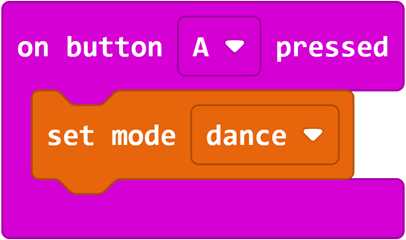
Program Link: https://makecode.microbit.org/_2pyCch8MiD7P
Program 2: Use loop module to make the robot walk along a fixed route (Advanced Task)
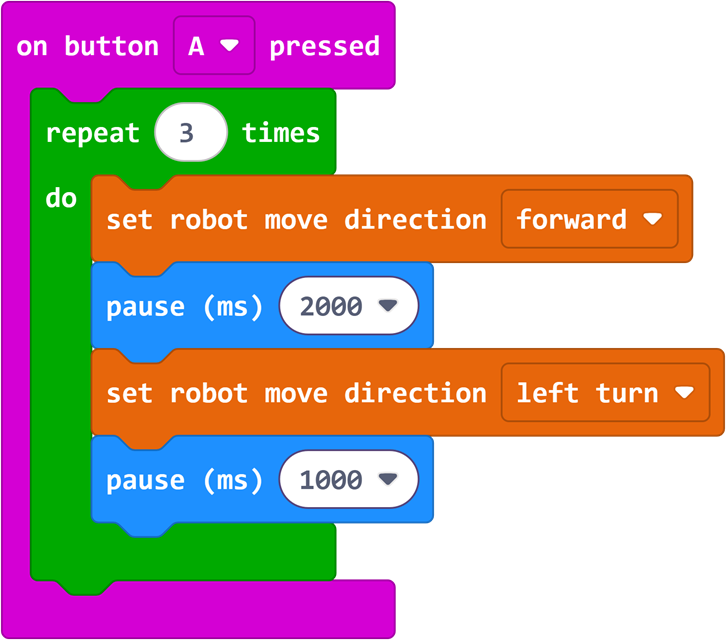
Program Link: https://makecode.microbit.org/_MtjFbd5HAEJb
Summary & Sharing
Invite each group to share their programming experience and discoveries during debugging, focusing on communication: How does adjusting the number of loops affect the robot's actions? What is the difference between writing programs with and without loop modules? The teacher combines students' sharing to emphasize the core function of the loop module - "accomplish more repetitive actions with fewer blocks", and previews that the next class will further learn to combine multiple action blocks on the basis of loops to make the robot's performances more rich and wonderful.