Case 10: Comprehensive Lighting Programming – Cool Lights for the Robot
Case Introduction
This lesson comprehensively uses all previously learned modules in MakeCode graphical programming (action blocks, loop modules, conditional judgment modules, variable modules, music modules), and adds a new lighting control module. Combined with the hardware functions of the PU Robot’s 4 RGB full-color LEDs and 2 white spotlights (eye lights), students will write a comprehensive performance program integrating "movement + music + lighting". As the culminating project of the entire course, this case emphasizes the synchronization and coordination of the three modules, cultivating students' system integration ability, creative choreography ability, and engineering thinking.
Teaching Preparation
| Name | Image |
|---|---|
| PU Robot Kit | 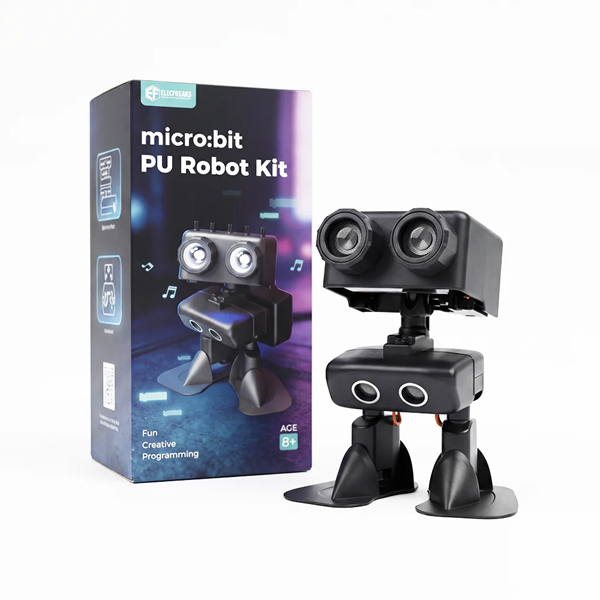 |
| Programming Device (Computer) | |
| Flat Ground | |
| Obstacles (Blocks / Books) |
Hardware Introduction – PU Robot Lighting System
| Lighting Type | Quantity | Position | Color / Function | Effects |
|---|---|---|---|---|
| RGB Full-Color LED | 4 | Breathing light, rainbow fade, flashing | ||
| White Spotlight (Eye Light) | 2 | Steady on, flashing |
Teacher Tip: Lighting effects are visible to the naked eye with intuitive debugging feedback, making it easy for students to gain a sense of accomplishment. It is recommended that lighting design matches the movement rhythm, allowing the robot's "eyes" and "whole body" to form a unified visual expression.
Course Objectives
Recognize the lighting hardware of the PU Robot (4 RGB LEDs + 2 white spotlights) and understand the basic principles of lighting control;
Master the usage of the lighting module in MakeCode, and independently control RGB colors, eye light switches, and lighting animation effects;
Synchronize and coordinate the lighting module with action modules and music modules to write a three-in-one program where "movements change with lights, and music plays with beats";
Complete the project by comprehensively using all learned modules, cultivating system integration ability, creative design ability, and team collaboration spirit.
Course Introduction
Class, today we will equip the robot with "colorful lights"! Our PU Robot has 4 color-changing RGB lights and 2 shiny "eye lights". Paired with music, let the robot’s lights flash to the beat, plus our choreography – it will be a complete mini robot show! From this lesson on, the robot is no longer just a moving "little iron man", but a "stage star" that can dance, sing, and glow! Let’s light it up together!
Learning Exploration
Step 1: Learn the Lighting Module
Recognize Lighting Blocks: Guide students to observe the lighting blocks in the module area;
Test Lighting Effects: Download a blank program, try different blocks one by one, observe the actual lighting effects of the robot, and record which block corresponds to which lighting response.
Step 2: Basic Lighting Programming Practice
- Wrap "turn on eye lights → delay 500ms → turn off eye lights → delay 500ms" with "repeat 5 times"
- Students download and test to observe the eye light flashing effect
Basic Practice 2: RGB LED Color Change – Write a program to make the 4 RGB LEDs display different colors in sequence:
Set RGB color to "red", delay 1 second
Set RGB color to "green", delay 1 second
Set RGB color to "blue", delay 1 second
Guide students to think: What other colors can be mixed? (red + green = yellow, red + blue = purple, green + blue = cyan, all on = white)
Step 3: Lighting + Music + Movement – Three-in-One Comprehensive Programming
Three-in-One Design Concept: Explain the core logic of synchronous coordination among "movement + lighting + music":
- Music for hearing – plays melodies and creates atmosphere;
- Movement for body – moves to the beat;
- Lighting for vision – enhances the sense of beat and increases performance tension;
MakeCode Programming
Basic Lighting Practice
Program 1: Eye Light Flashing Practice
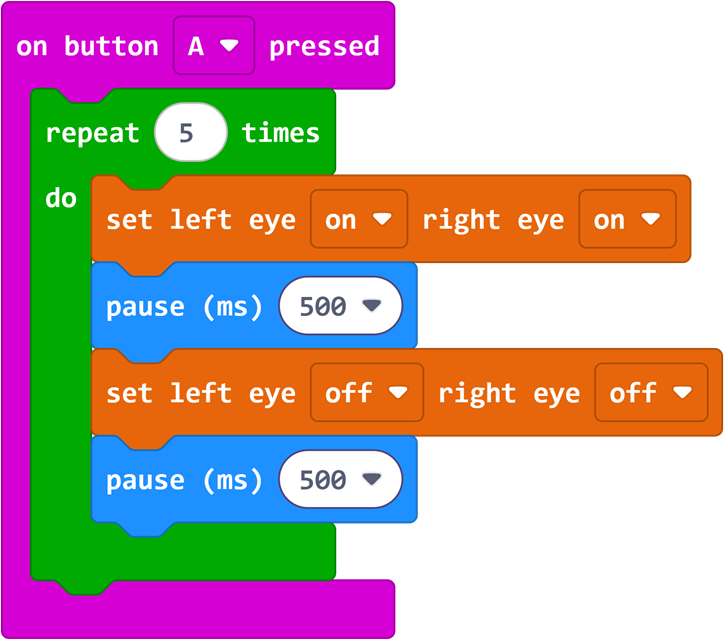
Program Link: https://makecode.microbit.org/_RUJdHuAjxRqg
Program 2: RGB LED Rainbow Color Practice
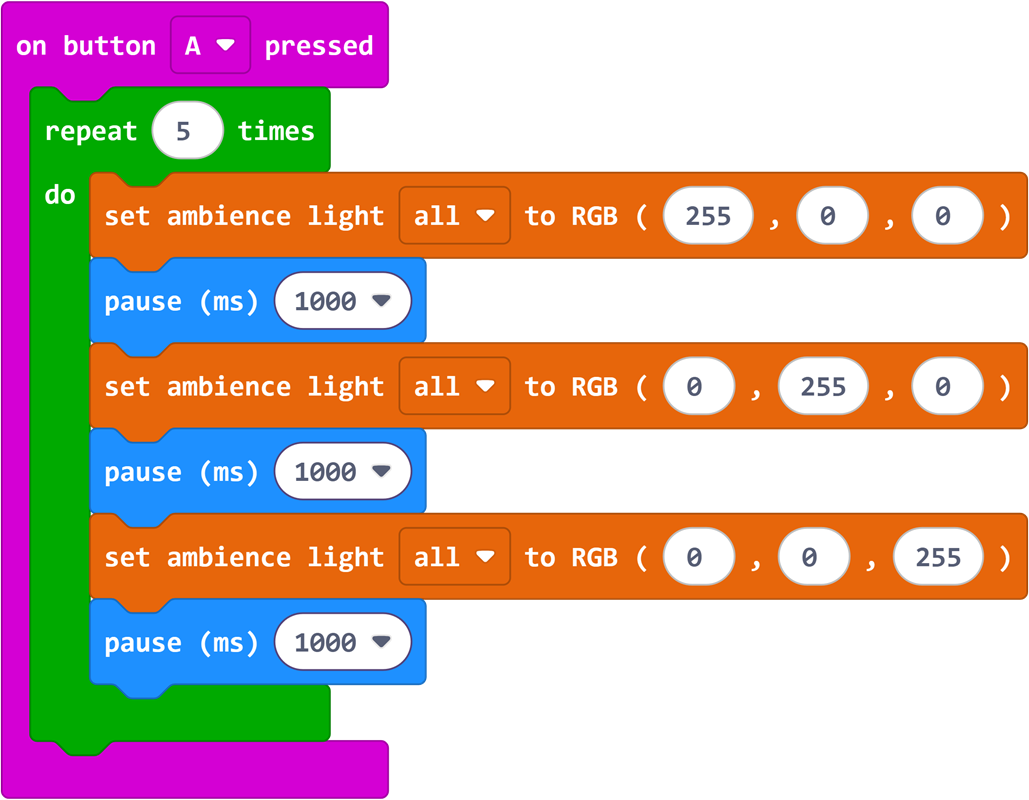
Program Link: https://makecode.microbit.org/_AuUb0TY4VeUM
Comprehensive Performance Program
Program 3: Three-in-One Comprehensive Performance of Movement + Lighting + Music
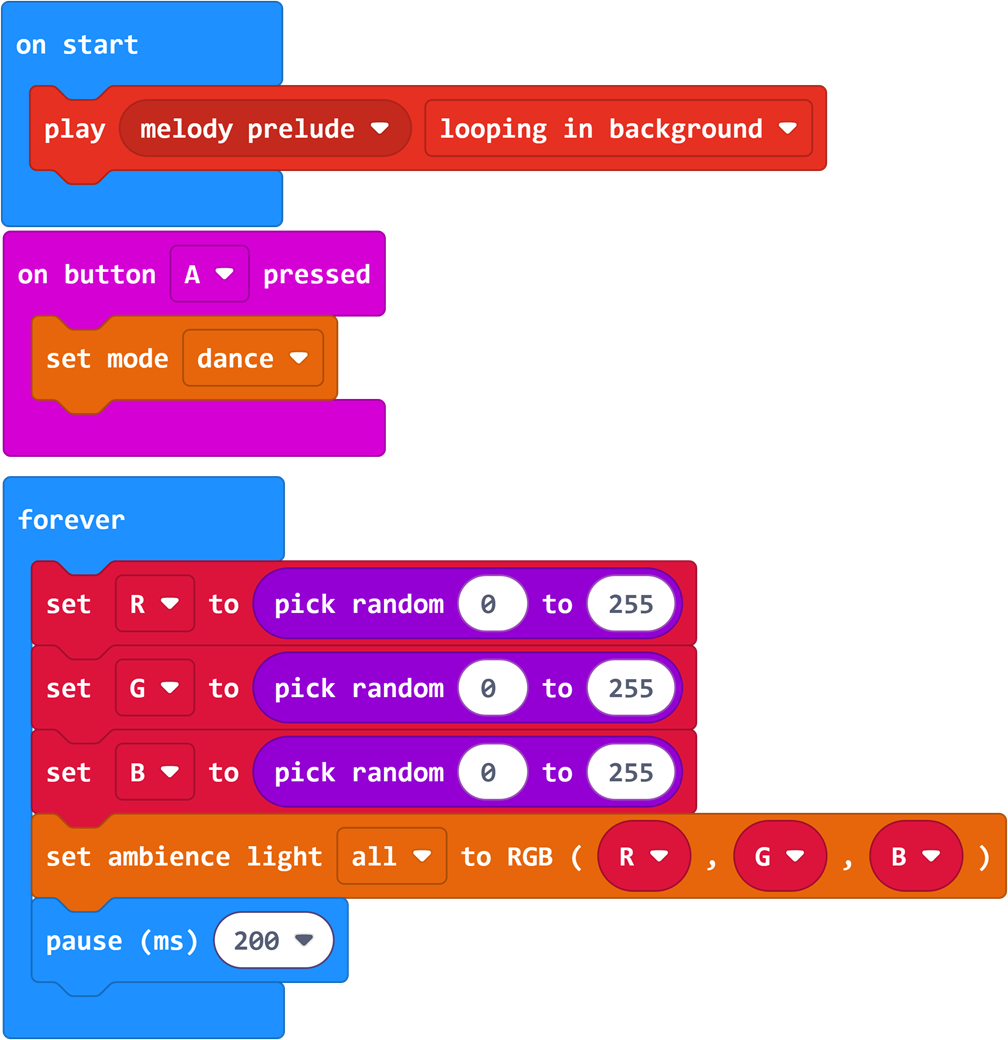
Program Link: https://makecode.microbit.org/_1ae9LzFiXUtV
Summary & Sharing
Each group presents their comprehensive "lighting + movement + music" performance and shares design ideas: How did you coordinate lighting and movements? What was the most difficult part during debugging? Combining the presentations, the teacher summarizes:
- Lighting is the robot’s "emotional expression": Bright eyes look like smiling, flashing eyes show excitement, and lights make the robot more vivid;
- Three-in-One makes the performance wonderful: Movement is the body, music is the sound, and lighting is the color – together they create a complete show;
- Debugging perfects the work: Try more times and adjust parameters to find the best effect.
After-Class Extension
- Design a "Mood Robot" lighting program at home: Use different colors to represent different moods (green = happy, blue = calm, red = excited, purple = mysterious);
- Challenge: Can the lights change color automatically when the robot walks (change color after moving a distance)? Think about how to use loop modules to achieve this;
- Further exploration: Can the 4 RGB LEDs display different colors separately? Try controlling each light’s color individually.