Introduction to Software Blocks
This kit is built around the Nezha Multifunctional Expansion Box V2, with the micro:bit as the main controller. Its programming platform uses Microsoft's MakeCode. To facilitate user programming, the ELECFREAKS team has developed a dedicated programming library specifically for the Nezha Multifunctional Expansion Box V2. Below is a detailed introduction to each programming command's function and parameter range:
Introduction to Software Building Blocks
| Building Block | Function | Parameters |
|---|---|---|
 | Set the motor at the corresponding port to rotate at a specified speed in a specified direction. | Parameter 1: Dropdown Options: M1, M2, M3, M4 Parameter 2: Integer Range: -100~100 Parameter 3: Dropdown Options: Clockwise, Counterclockwise Parameter 4: Integer Parameter 5: Dropdown Options: Degrees, turns, Seconds |
 | Set the motor at the corresponding port to rotate by a specified angle in a specified direction. | Parameter 1: Dropdown Options: M1, M2, M3, M4 Parameter 2: Dropdown Options: Clockwise, Counterclockwise, shortest Parameter 3: Integer |
 | Stop the motor at the corresponding port | Parameter 1: Dropdown Options: M1, M2, M3, M4 |
 | Set the motor at the corresponding port to run at a specified speed | Parameter 1: Dropdown Options: M1, M2, M3, M4 Parameter 2: Integer Range: -100~100 |
 | Get the current relative angle value of the motor | Parameter 1: Dropdown Options: M1, M2, M3, M4 |
 | Get the current absolute angle value of the motor | Parameter 1: Dropdown Options: M1, M2, M3, M4 |
 | Get the current speed of the motor | Parameter 1: Dropdown Options: M1, M2, M3, M4 |
 | Set the current position of the motor at the corresponding port as the zero position for the relative angle | Parameter 1: Dropdown Options: M1, M2, M3, M4 |
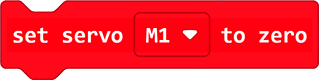 | Set the motor at the corresponding port to rotate to the zero position | Parameter 1: Dropdown Options: M1, M2, M3, M4 |
 | Set the connection ports for the car's left wheel motor and right wheel motor | Parameter 1: Dropdown Options: M1, M2, M3, M4 Parameter 2: Dropdown Options: M1, M2, M3, M4 |
 | Set the speed and driving direction of the car | Parameter 1: Value Range: -100~100 Parameter 2: Dropdown Options: Forward, Backward |
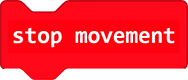 | Stop the car | |
 | Set the circumference of the wheel | Parameter 1: Integer Parameter 2: Dropdown Options: cm, inch |
 | Set the car to move a specified distance at a specified speed in a specified direction | Parameter 1: Value Range: -100~100 Parameter 2: Dropdown Options: Forward, Backward Parameter 3: Integer Parameter 4: Dropdown Options: Degrees, turns, Seconds, cm, inch |
 | Set the speed of the car's left and right wheels | Parameter 1: Value Range: -100~100 Parameter 2: Value Range: -100~100 |
 | Set the wheelbase (distance between the two wheels) | Parameter 1: Value Parameter 2: Dropdown Options: cm, inch |
 | Set the combined rotation calibration coefficient | Parameter 1: Value |
 | Set the motor rotation angle and rotation speed | Parameter 1: Value Parameter 2: Value Range: -100~100 |
 | Get the current firmware version number |