8x16 Matrix Module(EF05029)
Introduction
The 8x16 dot matrix screen is a display screen that can show emoji expressions using an 8x16 dot matrix.

Products Link
ELECFREAKS PlanetX 8x16 Matrix Sensor
Characteristic
Designed in RJ11 connections, easy to plug.
Specification
| Item | Parameter |
|---|---|
| SKU | EF05029 |
| Connection | RJ11 |
| Type of Connection | IIC |
| Working Voltage | 3.3V |
Outlook
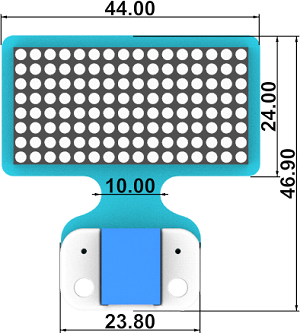
Quick to Start
Materials Required and Diagram
Connect the 8x16 Matrix module to the IIC port in the Nezha expansion board as the picture shows.

MakeCode Programming
Step 1
Click "Advanced" in the MakeCode drawer to see more choices.
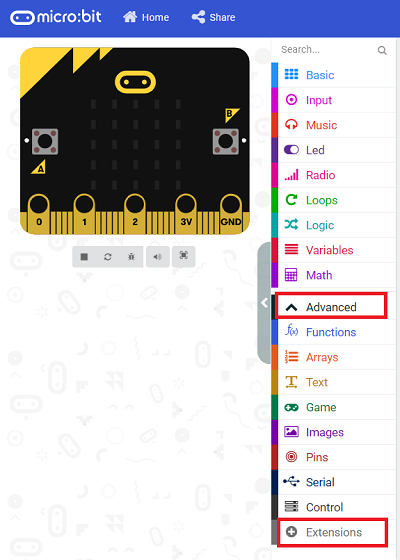
We need to add a package for programming, . Click "Extensions" in the bottom of the drawer and search with "PlanetX" in the dialogue box to download it.
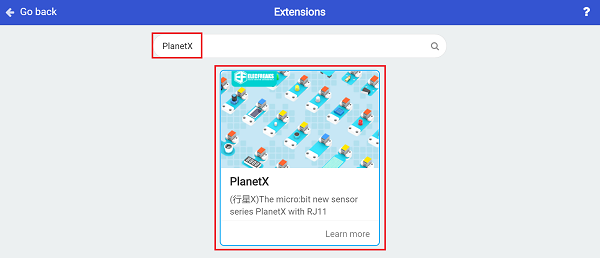
Note: If you met a tip indicating that the codebase will be deleted due to incompatibility, you may continue as the tips say or build a new project in the menu.
Step 2
Code as below:

Link
Link: https://makecode.microbit.org/_H1Dec3A9iDDM
You may also download it directly below:
Result
The expresssions display on the 8x16 matrix module.
Python Programming
Step 1
Download the package and unzip it: PlanetX_MicroPython
Go to Python editor

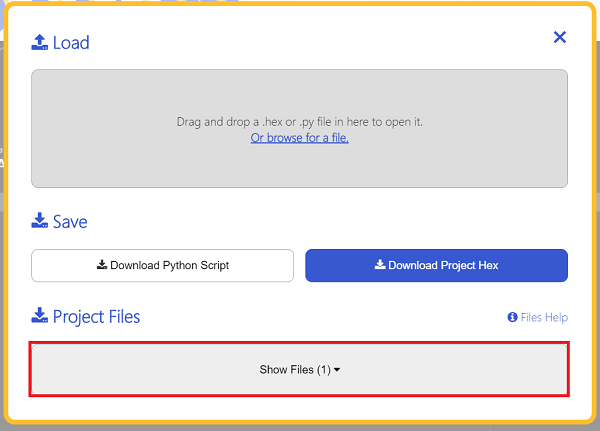
We need to add matrix.py for programming. Click "Load/Save" and then click "Show Files (1)" to see more choices, click "Add file" to add matrix.py from the unzipped package of PlanetX_MicroPython.


Step 2
Reference
from microbit import *
from matrix import *
matrix = MATRIX()
x, y = 0, 0
while True:
    for y in range(8):
        for x in range(16):
            matrix.set_matrix_draw(x, y)
    matrix.set_matrix_clear()
Result
Each LED lights on from the sequence of left to right and up to down, then they light off after all the LEDs light up.