Two Channels Tracking Module(EF05019)
Introduction
The two channels Tracking Module has integrated two groups of reflective infrared pair diode, which can be used to make line tracking smart cars.

Products Link
ELECFREAKS PlanetX Two Channels Tracking Module
Characteristic
Designed in RJ11 connections, easy to plug.
Specification
| Item | Parameter |
|---|---|
| SKU | EF05019 |
| Connection | RJ11 |
| Type of Connection | Digital output |
| Working Voltage | 3.3V |
| Effective Distance | 8~11mm |
| Black Line | Low level output |
| White Line | High level output |
Outlook

Quick to Start
Materials Required and Diagram
Connect the Two channels tracking module to J1 port in the Nezha expansion board as the picture shows.

Learning Mode
【Note: To ensure optimal line tracking performance, we recommend entering Learning Mode after the car is assembled. Height calibration will be completed in approximately 15 seconds.】
The latest 2-Channel Line Tracking Sensor can optimize its sensitivity through Learning Mode. And The sensor probe should be positioned 8mm to 16mm above the ground during use.
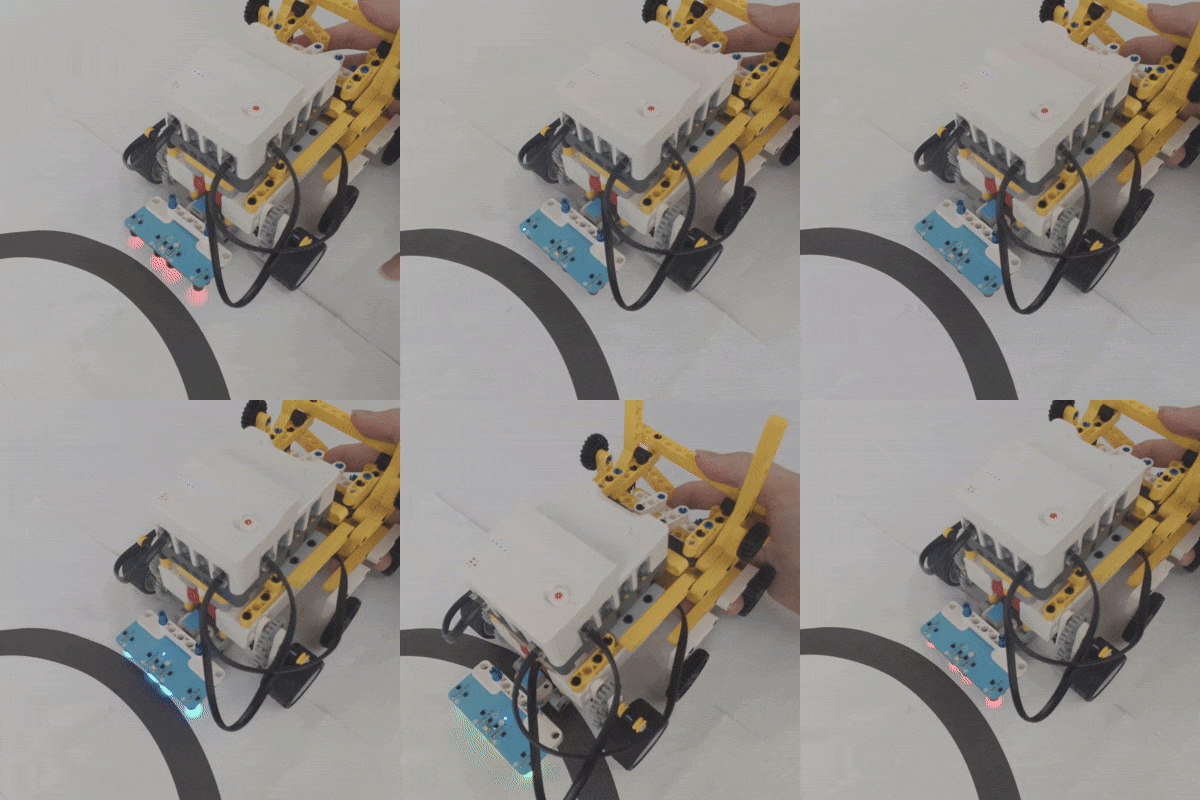
- Position the sensor probe directly over the map's background area and press the Learning button.
- The probe's indicator light will start flashing.
- When the indicator light begins flashing rapidly, move the probe back and forth horizontally across both the map background and the line track.
- Continue moving it back and forth until the indicator light stops flashing. Learning is now complete.
- Once learning is successful, the indicator light will turn off. When the probe detects the line track, the corresponding indicator light will illuminate.
Please refer to the image below for the operational workflow (using the 4-Channel sensor as an example). Note the difference: After learning is completed, the 2-Channel sensor's indicator light turns off, whereas the 4-Channel sensor's indicator light remains steadily on.
MakeCode Programming
Step 1
Click "Advanced" in the MakeCode drawer to see more choices.
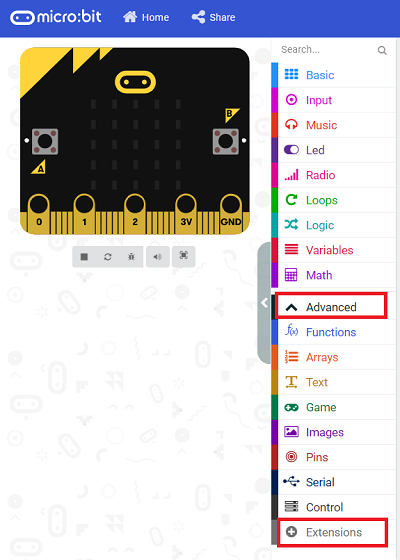
We need to add a package for programming, . Click "Extensions" in the bottom of the drawer and search with "PlanetX" in the dialogue box to download it.
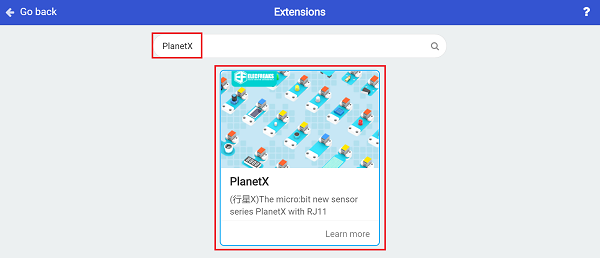
Note: If you met a tip indicating that the codebase will be deleted due to incompatibility, you may continue as the tips say or build a new project in the menu.
Step 2
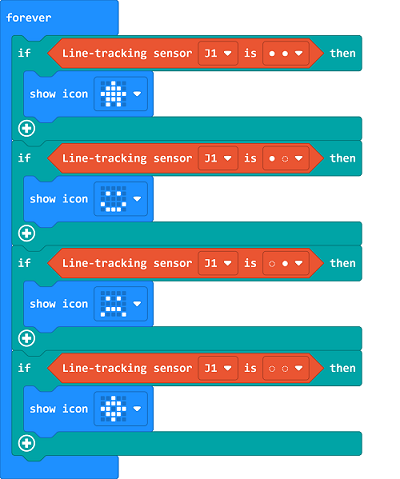
Code as below:
Link
Link: https://makecode.microbit.org/_hy3VDtA3xAqE
You may also download it directly below:
Result
Different icons display on the micro:bit in accordance with the different status detected by the tracking module.
Python Programming
Step 1
Download the package and unzip it: PlanetX_MicroPython
Go to Python editor

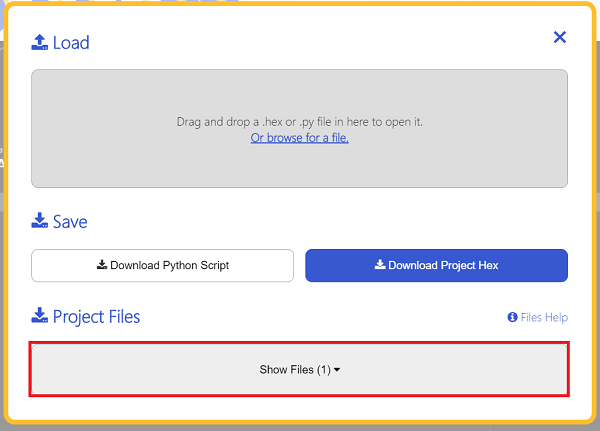
We need to add enum.py and tracking.py for programming. Click "Load/Save" and then click "Show Files (1)" to see more choices, click "Add file" to add enum.py and tracking.py from the unzipped package of PlanetX_MicroPython.


Step 2
Reference
from microbit import *
from enum import *
from tracking import *

tracking = TRACKING(J1)
while True:
    if tracking.get_state() == 11:
        display.show(Image.YES)
    elif tracking.get_state() == 10:
        display.show(Image.SAD)
    elif tracking.get_state() == 00:
        display.show(Image.NO)
    elif tracking.get_state() == 01:
        display.show(Image.HAPPY)
Result
Different icons display on the micro:bit in accordance with the different status detected by the tracking module.
Learning Mode
The latest dual-channel line-following sensor enables sensitivity optimization through learning mode.
Point the probes of the dual-channel line-following sensor directly at the map background area, then press the learning button.
The probe indicator lights will start flashing.
When the indicator lights flash rapidly, slide the line-following probes horizontally back and forth across the map background and line track.
Keep sliding the probes back and forth until the probe fill lights stop flashing — the learning process is finished.
Notes
In use, the ground clearance of the line-following probes must be kept between 8 mm and 16 mm.
After successful learning, all indicator lights will turn off. When a probe detects the line track, its corresponding indicator light will light up.