Rainbow LED Ring(EF05015)
Introduction
Rainbow LED Ring is based on WS2812B bead that can show the RGB.

Products Link
ELECFREAKS PlanetX LED - Rainbow
Characteristic
Designed in RJ11 connections, easy to plug.
Specification
| Item | Parameter |
|---|---|
| SKU | EF05015 |
| Connection | RJ11 |
| Type of Connection | Digital input |
| Working Voltage | 3.3V |
| Core IC | WS2812 3535 Encapsulation |
| Number of Pixels | 8 |
Outlook

Quick to Start
Materials Required and Diagram
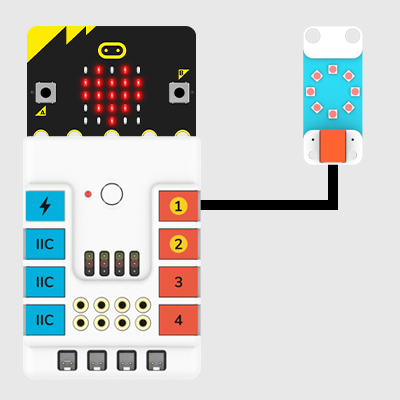
Connect the Rainbow LED ring to J1 port in the Nezha expansion board as the picture shows.
MakeCode Programming
Step 1
Click "Advanced" in the MakeCode drawer to see more choices.
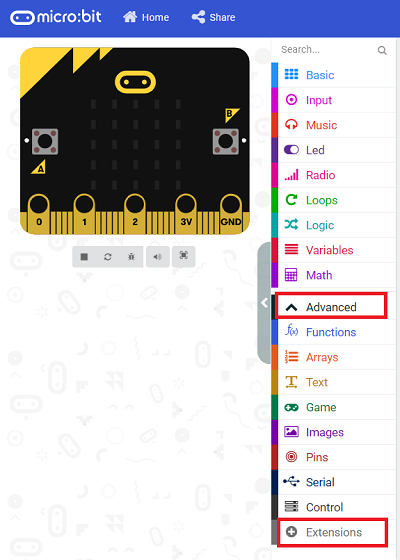
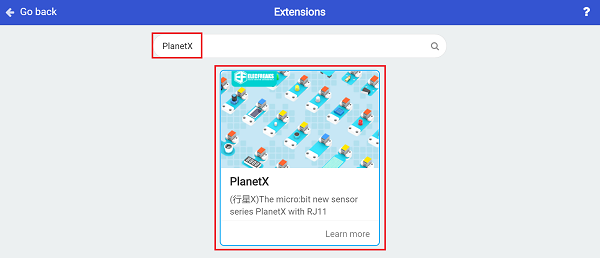
We need to add a package for programming, . Click "Extensions" in the bottom of the drawer and search with "PlanetX" in the dialogue box to download it.
Note: If you met a tip indicating that the codebase will be deleted due to incompatibility, you may continue as the tips say or build a new project in the menu.
Step 2
Code as below:

Link
Link: https://makecode.microbit.org/_AU7FyLCLFTMY
You may also download it directly below:
Result
Rainbow LED ring lights on.
Python Programming
Step 1
Download the package and unzip it: PlanetX_MicroPython
Go to Python editor
Step 2
Reference
from microbit import *
import neopixel
from enum import *
from random import randint
np = neopixel.NeoPixel(J1, 8)
while True:
    for pixel_id in range(0, len(np)):
        red = randint(0, 60)
        green = randint(0, 60)
        blue = randint(0, 60)
        np[pixel_id] = (red, green, blue)
        np.show()
        sleep(100)
Result
Rainbow LED ring lights on after powering on.