MQ5 Gas Sensor(EF05033)
Introduction
MQ5 Gas sensor has a good sense to liquefied gas, natural gas and coal gas that are widely used in cities, but it doesn’t work on ethanol or smoke.

Products Link
Characteristic
Designed in RJ11 connections, easy to plug.
Specification
| Item | Parameter |
|---|---|
| SKU | EF05033 |
| Connection | RJ11 |
| Type of Connection | Analog output |
| Working Voltage | 3.3V |
Outlook

Quick to Start
Materials Required and Diagram
Connect the MQ5 Gas sensor to J1 port and the OLED to the IIC port in the Nezha expansion board as the picture shows.

Note: A preheating for 3 minutes after powering on is required before using.
MakeCode Programming
Step 1
Click "Advanced" in the MakeCode drawer to see more choices.
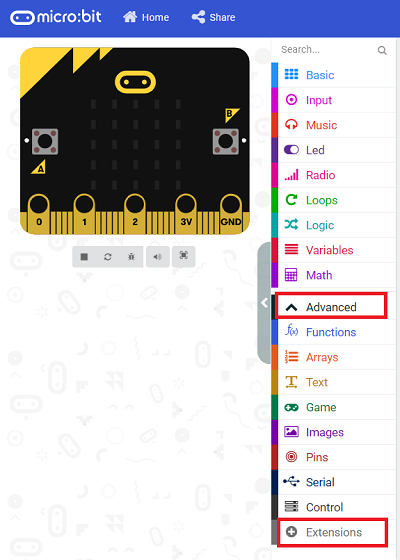
We need to add a package for programming, . Click "Extensions" in the bottom of the drawer and search with "PlanetX" in the dialogue box to download it.
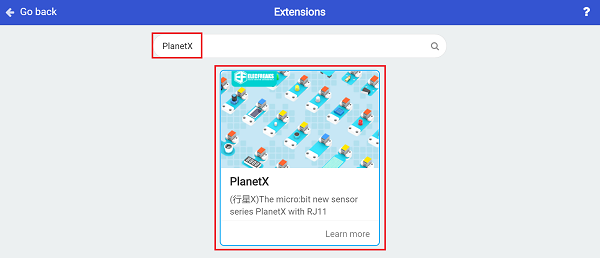
Note: If you met a tip indicating that the codebase will be deleted due to incompatibility, you may continue as the tips say or build a new project in the menu.
Step 2
Code as below:

Link
Link: https://makecode.microbit.org/_6H75oo6ojfjT
You may also downoad it directly below:
Result
The value detected from MQ5 Gas sensor displays on the OLED screen.
Python Programming
Step 1
Download the package and unzip it: PlanetX_MicroPython
Go to Python editor

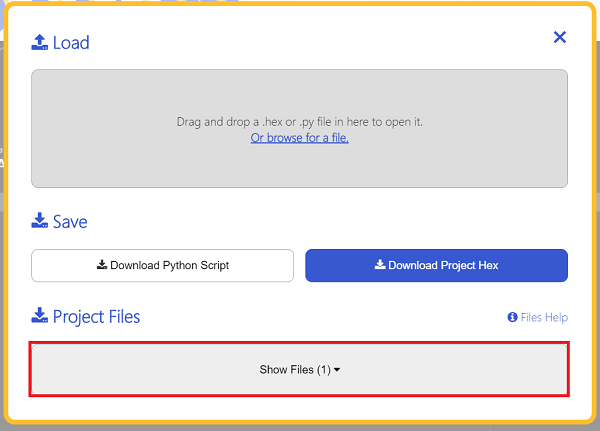
We need to add enum.py and co.py for programming. Click "Load/Save" and then click "Show Files (1)" to see more choices, click "Add file" to add enum.py and co.py from the unzipped package of PlanetX_MicroPython.


Step 2
Reference
from microbit import *
from enum import *
from co import *
co = CO(J1)
while True:
    display.scroll(co.get_co())
Result
The value detected from MQ5 Gas sensor displays on the micro:bit.