Case 08: Search for Light
Purpose
- Build a Wonder Rugged Kit that can search for light.
Products Link
Background Knowledge
Software
Program
Step 1
Click "Advanced" in the drawer of MakeCode to see more choices.

For programming the Wonder Rugged Kit, we need to add a package. Click "Extensions" at the bottom of the drawer and then search "Wukong" in the dialogue box to download it.

Note: If you get a warning indicating some packages will be removed because of incompatibility issues, you can follow the prompts or create a new project in the menu.
Step 2
Click Wukong to choose mecanum block.

Step 3
Drag mecanum into on start block and set the connection for servos accordingly, then initialize the LEDs.
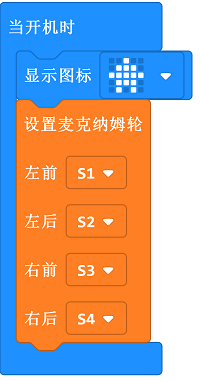
Step 4
Set variable i as the brightness level and judge the value of it. If the value of i is below 50, the car turns left; or it moves forward.
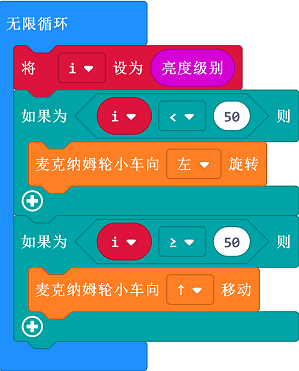
Program
Links: https://makecode.microbit.org/_Kv3dfY02f52g
You can also download it directly:
Result
The car spins itself if no light being detected, or it goes straight towards the light.
Exploration
If we want the farther away the car is from the light source, the faster it is; and the closer it is to the light source, the slower it is, how to programme?