Case 02: Drifting Left&Right
Purpose
- Programme to make Wonder Rugged Kit drift left or right.
Products Link
Background Knowledge
Software
Program
Step 1
Click "Advanced" in the drawer of MakeCode to see more choices.

For programming, we need to add a package. Click "Extensions" at the bottom of the drawer and then search "Wukong" in the dialogue box to download it.

Note: If you get a warning indicating some packages will be removed because of incompatibility issues, you can follow the prompts or create a new project in the menu.
Step 2
Click Wukong to choose mecanum block.

Step 3
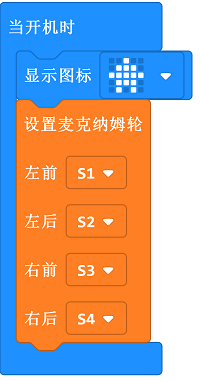
Drag mecanum into on start block and set the connection for servos accordingly.
Step 4
Set the car moving forward while pressing A+B , drifting to left while on tilt right , to right while on tilt left and stopping while on logo down.

Program
Links: https://makecode.microbit.org/_394b7kL88FuA
You can also download it directly:
Result
Set the car moving forward while pressing A+B , drifting to left while pressing button A , to right while pressing button B and stopping while on logo down.