Case 05: Colorful Car
Purpose
- Build a colorful Wonder Rugged Kit with the rainbow LEDs.
Products Link
Background Knowledge
Software
Program
Step 1
Click "Advanced" in the drawer of MakeCode to see more choices.

For programming, we need to add a package. Click "Extensions" at the bottom of the drawer and then search "Wukong" in the dialogue box to download it.

Note: If you get a warning indicating some packages will be removed because of incompatibility issues, you can follow the prompts or create a new project in the menu.
Step 2
Click Wukong to choose mecanum block.

Step 3
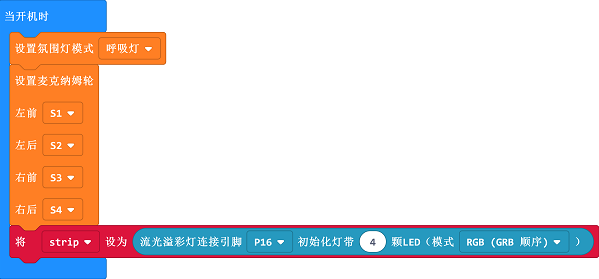
Drag mecanum and set light mode into on start block and set the connection for servos accordingly, set the light mode as breath and initialize the LEDs.
Step 4
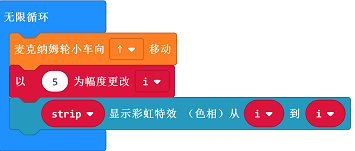
Set the car to move forward with the variable i ascending by 5; set the LEDs to show rainbow with the parameter in i.
Program
Links: https://makecode.microbit.org/_icqM2MK7WEyM
You can also download it directly:
Result
The car moves forward after starting with the light mode in breath and rainbow LEDs changing color.