Pacman Game
Purpose
Make a simple Pac-Man mini-game.
Materials Requested
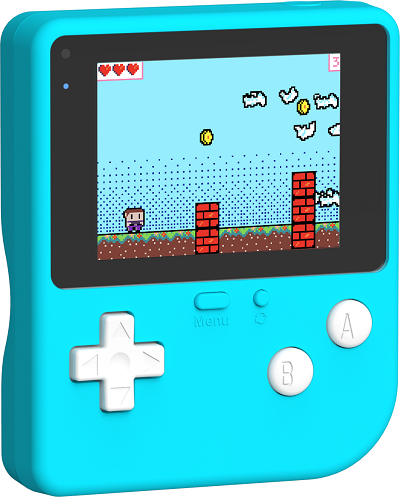
1 x [ELECFREAKS Retro Makecode Arcade For Education]
Software
Programming
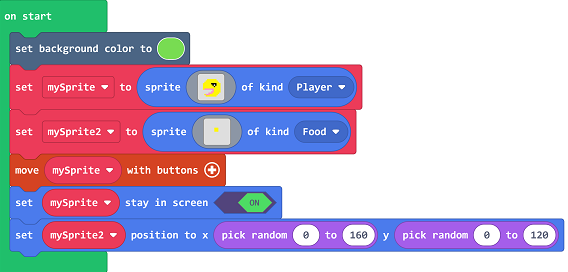
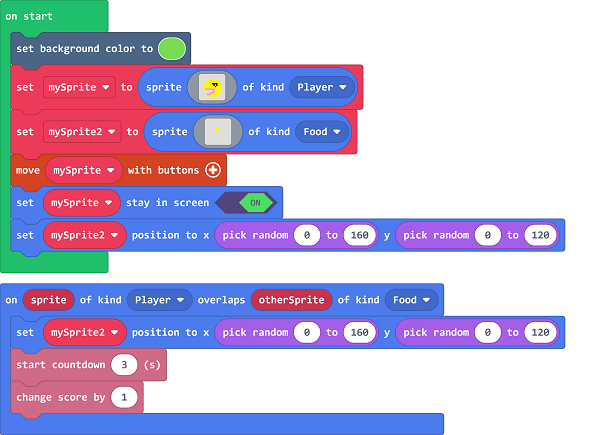
Set the background color, Create a new sprite mySprite, Type set to Player', New sprite mySprite2, Type set to Food.Control the movement of the sprite mySprite with the keys, Set the sprite mySprite in the screen, ``Set sprite mySprite2 to appear at a random location.`
When the player controls the character and the food overlap, Set food to reappear in random locations, Start the three-second countdown, Score increase by 1.
Procedures
Link: https://makecode.com/_H8tLp7FY8a8i
You can also download the program directly from the following pages.
You may download it directly below:
Program Download
Please see the documentation for the program download: Program Download Method
Conclusion
You can control Pac-Man to move in the screen through the button, when Pac-Man eats beans, then +1 point; when Pac-Man eats the first bean, then start the three-second countdown, the time is over, the game is over, you can eat beans to reset the countdown time.