Snowflake Buzzer for micro:bit(EF03419)
Introduction
The snowflake buzzer is a symbol of christmas day's snow. The snowflake buzzer is just like snow, comes in this christmas night and play the christmas music.
Products Link
ELECFREAKS micro:bit Snowflake Buzzer
Features
With crocodile clip lines, no need for a expansion board In snow shape, adapt to the christmas scene Play the christmas music with coding
Parameters
| Items | Parameters |
|---|---|
| Name | Snowflake Buzzer |
| SKU | EF03419 |
| Size | 45.72mm Standard Hexagon |
| Net Weight | 8.3g |
Quick Start
Preparation
1 x Snowflake Buzzer 1 x micro:bit(Please prepare by yourself) 3 x crocodile clip lines(Please prepare by yourself)
Hardware Connect
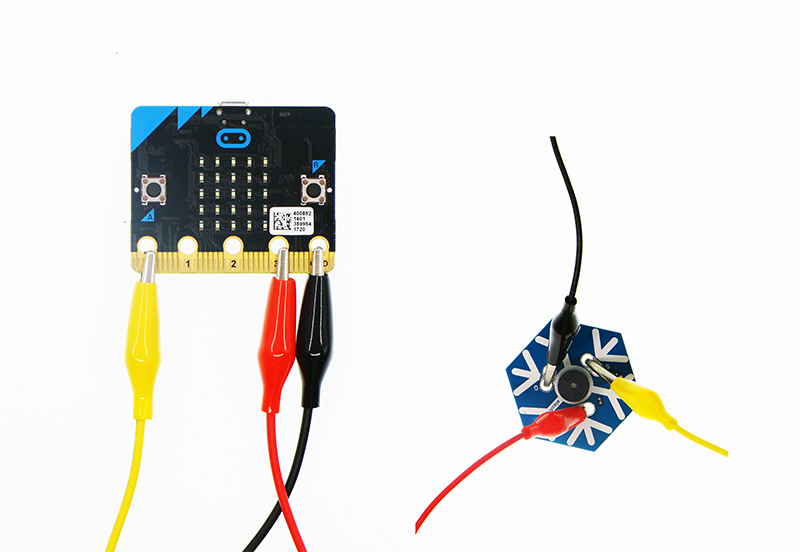
Connect the black crocodile clip line to the GND port of the micro:bit, the other side of the black crocodile clip line to the G port of the snowflake buzzer. Connect the red crocodile clip line to the 3V port of the micro:bit, the other side of the red crocodile clip line to the V port of the snowflake buzzer. Connect the yellow crocodile clip line to the 0 port of the micro:bit, the other side of the yellow crocodile clip line to the S port of the snowflake buzzer.
Software
Step 1
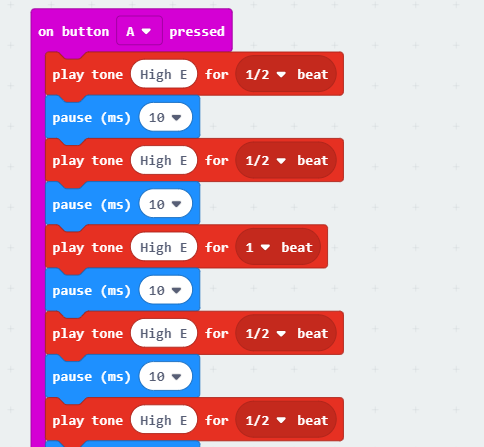
Set "on button A pressed" and write a little bit of music(as below picture).
Step 2
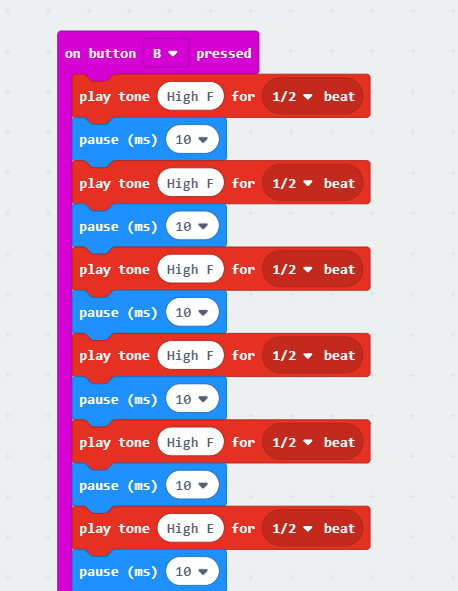
Set "on button B pressed" and write a little bit of music(as below picture).
Program
Program link:https://makecode.microbit.org/_W27acib6j8D3
You also could directly download program by visiting website as below:
Result
When the button A pressed, a piece of "Jingle Bells" plays. When the button B pressed, a piece of "Jingle Bells" plays.